Is Escalium Advanced Video Editor Safe?
Here's whythe warning appears.
Is Escalium Advanced Video Editor safe? Yes. Windows shows "Windows protected your PC" because the editor is new and not signed yet, not because it found a virus. Here's what the warning means and how to get past it.
Windows protected your PC
Microsoft Defender SmartScreen prevented an unrecognized app from starting. Running this app might put your PC at risk.
More info
Why Windows shows the warning
It's about reputation, not a virus
The warning comes from Microsoft Defender SmartScreen, a Windows filter for downloaded apps. It judges an app by how well Windows knows it.
Windows doesn't know the editor yet
Windows counts how many people have installed a file before. Escalium Advanced Video Editor is new, and each new version starts again from zero. So Windows asks you to confirm, as it does with many small apps.
We haven't paid for the signature yet
Big software companies buy a certificate that puts their name on the app. We haven't bought ours yet. That's why the warning says "Unknown publisher" instead of Escalium.
It isn't an antivirus alert
Windows didn't scan the file and find a problem. The box only says it hasn't seen this app enough times to recognise it. That's why it lets you choose "Run anyway".
How to install Escalium Advanced Video Editor
From the warning to the editor, step by step
Download the installer from escalium.io
Use the Download for Windows button on this page. The file name starts with Escalium-Video-Editor-Setup and ends in .exe.
Open it and click "More info"
Windows shows the blue "Windows protected your PC" box. At first it only has a "Don't run" button. Click "More info" under the text.
Check the name and click "Run anyway"
Now you see the file name next to "App" and "Unknown publisher". If the name starts with Escalium-Video-Editor-Setup, click "Run anyway".
Follow the installer
Keep the folder it suggests or pick another one. It adds the editor to your desktop and Start menu.
Open it and sign in
Sign in with your Escalium account, the same one you use on the web. You only do this once: the editor updates itself after that.
Windows protected your PC
Microsoft Defender SmartScreen prevented an unrecognized app from starting. Running this app might put your PC at risk.
- App:
- Escalium-Video-Editor-Setup-1.4.6.exe
- Publisher:
- Unknown publisher
How to check you have the real file
Make sure it's the real installer
The warning looks the same for any unsigned app. These checks tell you the file really comes from us.
Download it only from escalium.io
Or from the editor's official page on GitHub, where our installers are stored (github.com/Escalium-io/escalium-video-editor). Don't open a copy someone sent you or one from another site.
Check the file name
The real installer starts with Escalium-Video-Editor-Setup and ends in .exe. Windows shows that name in the warning, next to "App".
"Unknown publisher" is normal for now
Until we sign the editor, every real copy says "Unknown publisher". If the warning shows another company's name, the file isn't ours.
Scan it yourself if you want
Upload the installer to VirusTotal, a free website that checks a file with dozens of antivirus programs at once. You see the result on screen.
What Escalium Advanced Video Editor does on your PC
The app only opens Escalium
The editor is a window that opens escalium.io, with a few extras an installed app can give you. This is what it can and can't do.
Only Escalium's pages load in it
Plus the sign-in and payment pages it needs: Google, TikTok, Spotify and Stripe. Any other link opens in your usual browser.
It only asks for what the editor uses
The microphone for voice-overs, the files and folders you pick, full screen, notifications and extra monitors.
The page can't reach the rest of your PC
Escalium runs inside a closed space in the app. It can't start programs or look through your files on its own.
Your videos stay on your computer
Editing, Whisper subtitles and exports run on your own computer. Your projects and videos stay on your disk.
It checks its own subtitle engine
Before it runs the engine that writes your subtitles, the app checks the file is exactly the one we shipped.
It updates itself from the official page
New versions come from the same official page as the installer. You don't download it again.
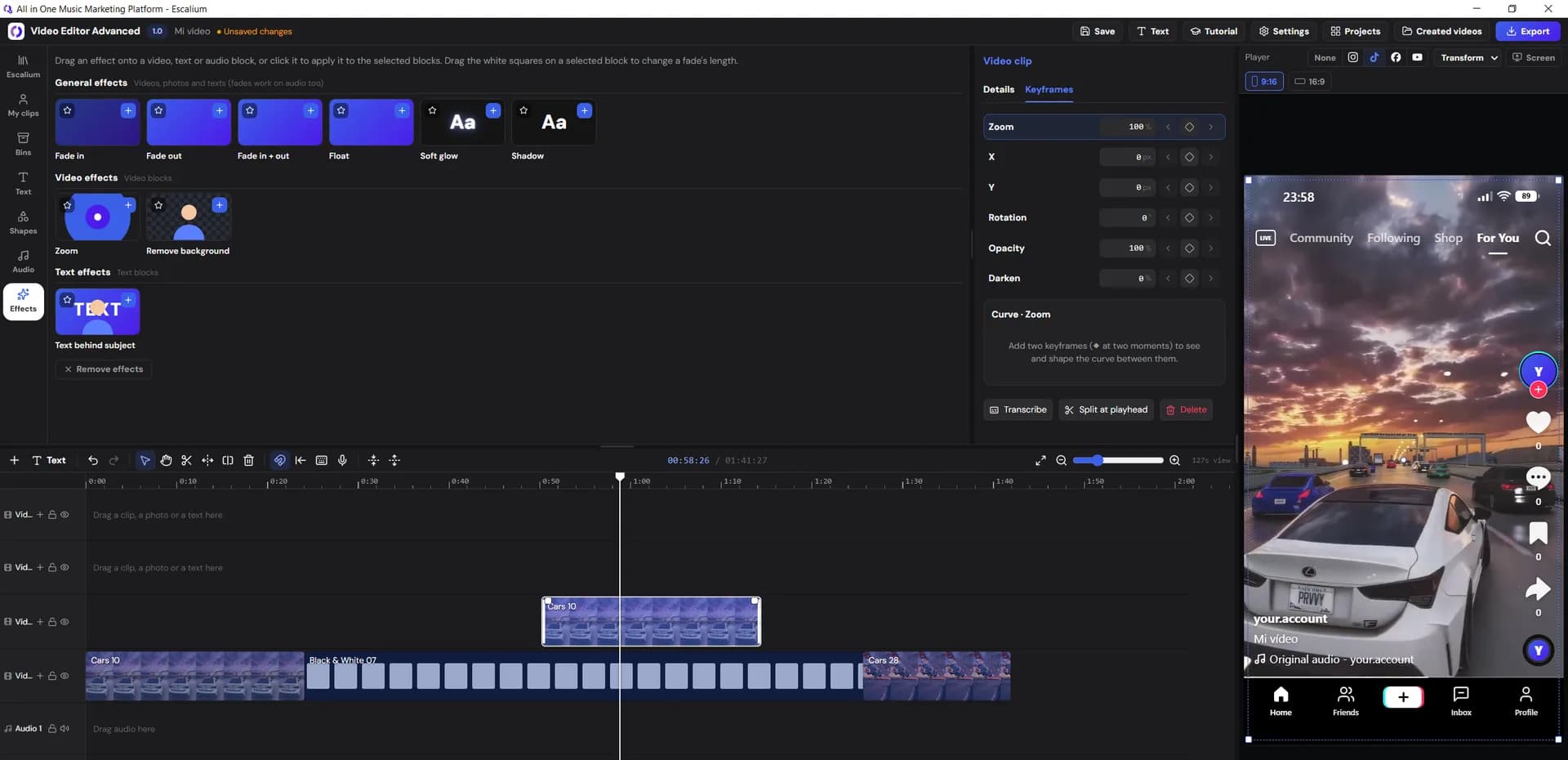
Escalium video editor online
Rather not install anything? Use it in your browser
Sign up at escalium.io and open the advanced editor from your dashboard. It's the same editor, with the same account and projects.
- Nothing to install, no Windows warning
- The way to use it on a Mac for now
- Masks and Magic Mask need the app
- The app keeps exporting at full speed with its window minimised
Frequently asked questions
Questions about the Windows warning
No. It's the desktop version of Escalium's advanced video editor. Windows warns about it because it's new and not signed yet, not because it found a virus.
Because we haven't bought a code signing certificate yet. That certificate is what puts a company's name in the warning instead of "Unknown publisher".
We're going to sign the editor soon. Then Windows will show Escalium as the publisher. The warning can still appear for a while, until Windows has seen enough people install it.
No. You only do it once, when you install the editor. After that it updates itself, so you don't download the installer again.
Some antivirus programs are strict with new apps. Check the file came from escalium.io and, if you want, scan it on VirusTotal. If you trust it, allow it in your antivirus. If not, use the editor on the web.
Not yet. Right now macOS doesn't let the Mac version open. Use the editor on the web in the meantime: sign up at escalium.io and open it from your dashboard.
Yes. The editor opens with Escalium's sign-in, and your projects are the same as on the web. Downloading the editor and signing up are free.
Install the editor and make your next video
Download Escalium Advanced Video Editor for Windows, click "More info" and "Run anyway", and sign in. Your projects are waiting.
- Free to download
- Updates itself
- Same account as the web