Kashie Alternative for Lyric Videos
A Kashie alternative where you can edit the video
Looking for a Kashie alternative for lyric videos? Kashie and Escalium both turn your song into lyric videos for TikTok, Reels and Shorts. In Escalium you can then open the video in a full editor, put your own clips behind the words and share a page for the song.
- Lyrics timed word by word
- Full video editor included
- Link page with click stats
 Escalium
Lyric videos, editor and links
 Kashie
AI lyric videos for short video apps
Two lyric video tools
What Kashie is for, and what Escalium is for
Both are made for musicians, and both start from your song. The difference is what you can do once the video exists.
Kashie: AI lyric videos for short video apps
Kashie is an AI tool for artists and labels. It turns a song into short lyric videos for TikTok, Instagram Reels and YouTube Shorts. It's made to get lyric videos ready to post fast.
What an artist may miss there
A lyric video tool is built for the lyric video. If you want to change the cut, put your own filmed clips behind the words or make a 16:9 version for YouTube, you may need a video editor too. And you still need a page where people can listen to the song.
What Escalium does
Escalium makes the lyric video too. It writes out the lyrics and times each word to your voice. Then the same video opens in the Advanced Video Editor, a full editor with tracks. The song also gets a smart link that counts the clicks on each platform.
Where they are the same
If all you need today is a vertical lyric video, both are built for that job. Both start from the audio and put the words on screen in time with the music.
Feature by feature
Escalium vs Kashie, side by side
What you need to go from a song to people listening to it. When something isn't what Kashie is made for, the cell says “Not the focus”.
| What you need | Escalium | Kashie |
|---|---|---|
| Made for | Artists, producers and labels | Musicians making short lyric videos |
| Lyric videos from your song | Lyrics written out and timed word by word, 99 languages | Its main product |
| Lyric styles | TikTok style, karaoke, typewriter, slam, neon, curved lines and more | Its own set of styles |
| Full editor with tracks, keyframes and colour | Advanced Video Editor, in the browser or on Windows | Not the focus |
| Long video into short clips | Long to Short: ranked vertical clips with captions | Not the focus |
| A link page for the song | Buttons for each platform, a player, pre-save on Creator and up | Not the focus |
| Clicks per platform | Visits and clicks for every button | Not the focus |
- Available
- Main focus
- Not the focus
The Kashie column says what Kashie is made for, from how it presents itself publicly (October 2026). Tools change fast: check Kashie's website for its current features and plans. Escalium's limits are on our pricing page.
Before you choose
What to check in a lyric video tool
Test any lyric video tool with one of your own songs. These are the things worth checking. Each answer says how Escalium does it.
Does each word come in on time?
Watch a fast verse, not only the chorus. In Escalium each word is timed to the vocal on its own, so fast parts stay in sync.
Can you fix a wrong word?
AI sometimes hears a word wrong, mostly with accents or slang. In Escalium you fix the word in the text and it keeps its timing.
Does it handle your language?
If you sing in Spanish, French or another language, test it with that song. Escalium writes out lyrics in 99 languages.
Can you use your own clips?
Many artists want their own filmed clips behind the lyrics. In Escalium you add them in the editor, or pick from 300+ ready clips.
Which sizes can you export?
TikTok needs 9:16, YouTube 16:9 and feed posts 4:5 or 1:1. Escalium exports all four from the same project.
Where do viewers go next?
A video brings views; you also want listens. Escalium gives the song a smart link with a button for each platform and counts the clicks.
What changes with Escalium
Open your lyric video in a full editor
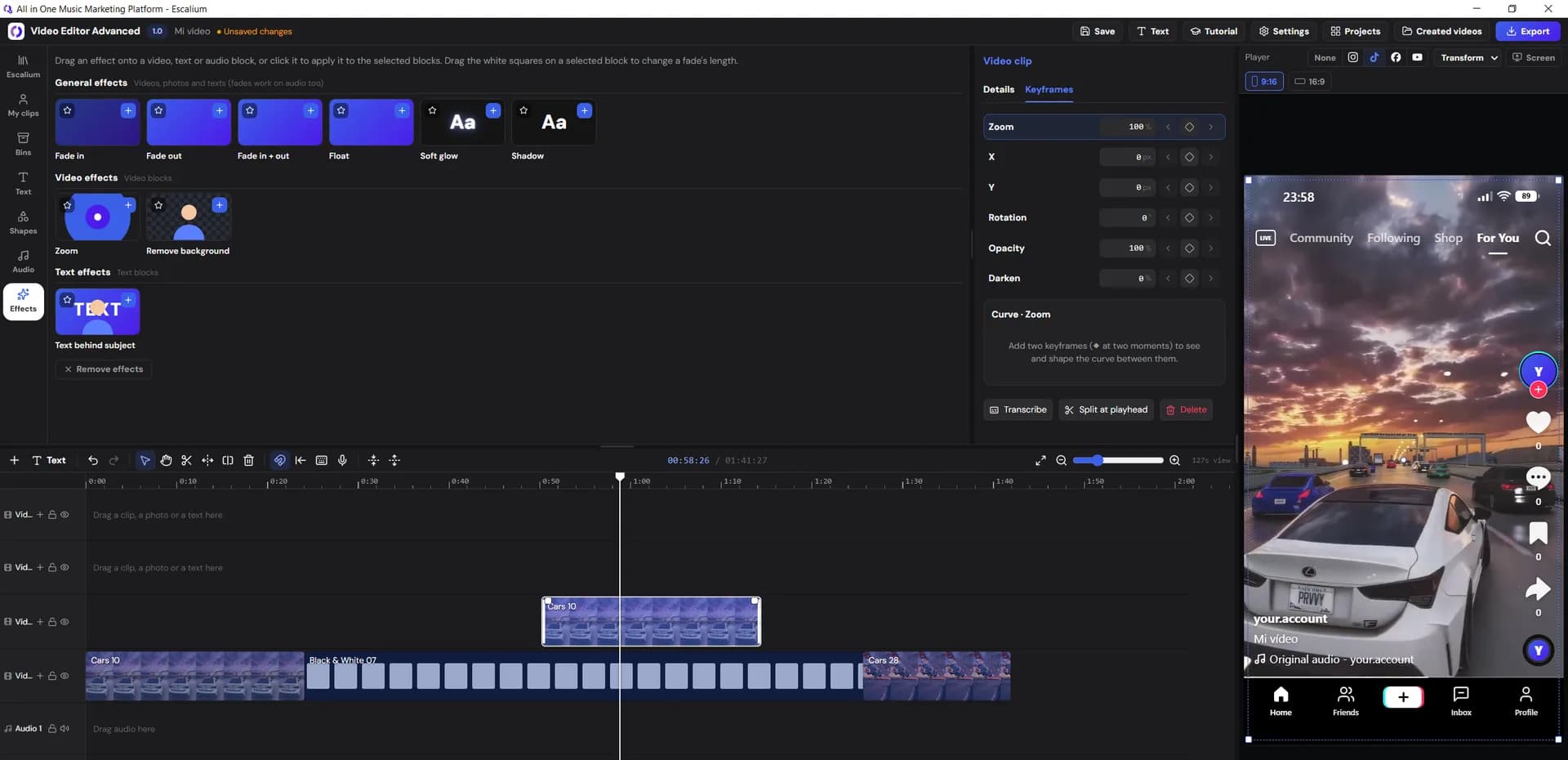
Sometimes the song needs more than a template: your own performance clip behind the words, a speed change on the drop, a colour that matches the cover. In Escalium the lyric video opens in the Advanced Video Editor. It has several tracks, keyframes, transitions and text animations. The lyrics stay on their own track, so you can change everything under them. It runs in the browser or as a Windows app.
- Your own clips, or 300+ ready clips from the Escalium library
- Colour tools: curves, HSL, LUTs and scopes
- Ready-made speed changes for the drop
- 1080p on the free plan, up to 4K on Video Editor, Creator and up
Which one to pick
Kashie or Escalium: when each one fits
Both make the lyric video itself. The choice depends on how much you want to do around it.
Kashie fits if…
- You only want lyric videos for short video apps, made fast
- You don't plan to edit the videos afterwards
- You already have a link page and stats somewhere else
Escalium fits if…
- You want to edit the lyric video when it needs more
- You film your own clips and want them behind the words
- You want to cut long videos into short clips in the same account
- You want one link page per song, with the clicks counted
Switching
Moving your lyric videos to Escalium
You can switch in one go or keep both for a while. These steps help.
Start with your next single
Upload the song to Escalium and make the first lyric video on the free plan. You'll see straight away how the timing works on your voice.
Bring your old videos in
Videos you made elsewhere are just video files. Add them to an editor project to recut them, add your own clips or make a 16:9 version for YouTube.
Use one link for every post
Publish one smart link for the song and put it everywhere. From that day, every click on Spotify, Apple Music or YouTube is counted in one place.
Decide with your own numbers
After a couple of weeks, the smart link shows which videos brought people to your music. Keep what helped and drop the rest.
FAQ
Kashie alternative: common questions
Yes, if you want lyric videos and more control over them. Escalium makes lyric videos timed to your voice. In the same account you also get a full video editor, Long to Short, smart links and click stats.
Yes. Escalium listens to the vocal and times each word, in 99 languages. If a word is wrong, you fix it in the text and it keeps its timing.
TikTok style, one word at a time, karaoke, typewriter, slam, neon and curved lines, among others. You choose the font and colours. In the Advanced Video Editor you can add text animations and keyframes.
Yes. In the Advanced Video Editor you add your own clips, or pick from 300+ ready clips in the Escalium library. The lyrics stay on their own track above them.
On the free plan you use up to 30 seconds of each song. Creator takes up to a minute. Artist and Label take the full song.
Yes. It includes 5 lyric videos a month, the Advanced Video Editor with 1080p export, Long to Short for 2 long videos a week (with a watermark) and one smart link.
Yes. The editor exports in 9:16 for TikTok, Reels and Shorts, 16:9 for YouTube, and 4:5 or 1:1 for feed posts.
Try it on your next song
Lyric videos you can keep editing
Make a lyric video from your song. Open it in the full editor when it needs more. Then send every post to a smart link that counts the clicks. You can start free.
- Lyrics written out and timed to your voice
- A full editor for your own clips
- One smart link for the song
The free plan includes 5 lyric videos a month.