Digital marketing for musicians
Each online channel does one job.Know which number to watch
Digital marketing for musicians means using the internet to get people to listen. Short videos, YouTube, your link in bio, fan groups, ads and playlists each do a different job. Here is what each one is for, and the number that tells you if it's working.
- Six channels explained
- One number per channel
- Free to start
Landing Page Analytics
Escalium.io
Views & Clicks
Traffic to this landing page over time
1,800
Page Visits
All sources — ads, shares, direct
512
Spotify Button Clicks
28.4% of visits
187
Apple Music Button Clicks
10.4% of visits
79
YouTube Button Clicks
4.4% of visits
The channels
Six channels and what each one is for
You don't need all six at once. Start with short videos and a smart link. Add the others when you have time, and judge each one only on its own job.
Short videos
What it's for: New people hear your song
TikTok, Instagram Reels and YouTube Shorts are where most people hear a new song for the first time. The apps show your video to people who don't follow you. They show it more when people watch to the end, watch again and share it.
How to use it
Post several videos of the same song: the hook with the lyrics on screen, you playing, clips cut to the beat. Start on the best second of the song. Keep your text away from the app's buttons.
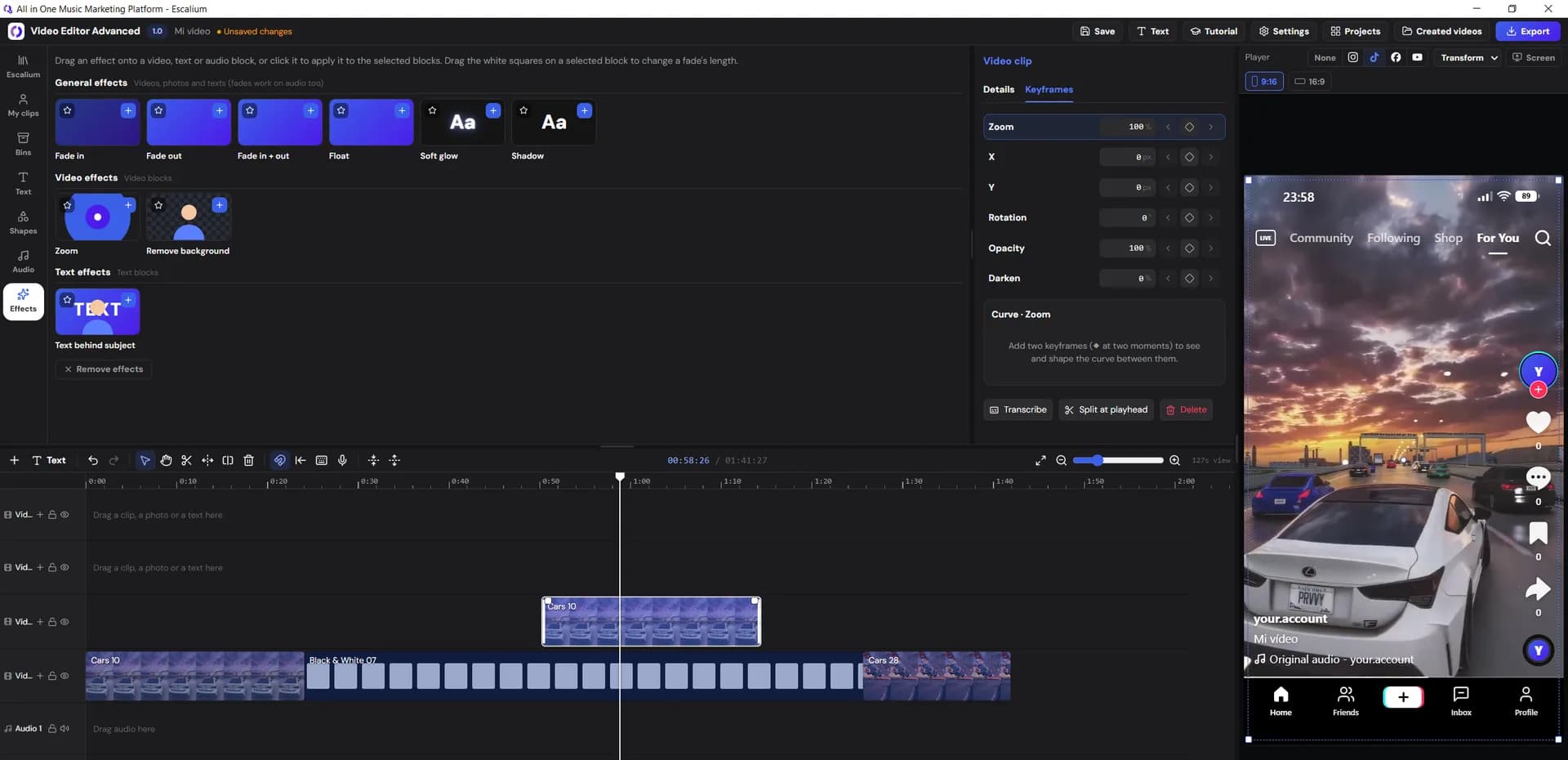
In Escalium: Lyric videos, the Advanced Video Editor with a preview of where TikTok, Instagram and YouTube put their buttons, and Long to Short.
See the video editorYouTube
What it's for: People find the song again, months later
YouTube is also a search engine. People search for a song's lyrics or video weeks and months after it came out. A lyric video with the song name and your name in the title keeps getting views long after release week.
How to use it
Upload a horizontal lyric video on release day, with the lyrics in the description. Then cut Shorts from the same project and point them to the full video.
In Escalium: The same project exported horizontal (16:9) and vertical (9:16), up to 4K on paid plans, with subtitles in 99 languages.
See the lyric video makerSmart link in your bio
What it's for: A visit turns into a listen
Every other channel ends here. A smart link is a small page for your song with a button for each platform. Each fan opens the app they already use. Every visit and every click is counted, which a plain Spotify link can't do.
How to use it
Make one smart link per song. Put it in your bio, captions, stories and ads. Add a different tag to the link on each channel, as explained further down.
In Escalium: Smart links for one song or several, pre-save pages, and the Meta pixel: a small code that tells your Facebook and Instagram ads who clicked (Creator plan and up).
Create a smart linkFan groups and email
What it's for: You reach your fans directly
Instagram or TikTok can stop showing your posts to your own followers at any time. A mailing list or a WhatsApp, Telegram or Discord group reaches people directly. These are the fans most likely to pre-save, buy a ticket and share.
How to use it
Invite people from your bio and your posts. Write only when there is news: a song, a show, a video from the studio. Use the email or group app you like. Escalium doesn't send emails.
In Escalium: Share your smart link or pre-save page in the group, with its own tag, to see what your fans did after reading.
Read about pre-save campaignsAds
What it's for: More people see a video that already works
Ads don't save a video nobody watches. They put money behind one that already works for free. Meta (Facebook and Instagram) and TikTok can show it to fans of artists who sound like you.
How to use it
Pay for the video that sent the most visits to your link. Send the ad to your smart link, not straight to Spotify. Start with a small daily budget and try two or three videos at once.
In Escalium: The ad videos and the smart link with the Meta pixel. You create and pay for the ad in Meta or TikTok. Escalium doesn't run ads.
Meta ads for musiciansPlaylists
What it's for: People who listen by style or mood hear you
There are three kinds: playlists made by Spotify's team, automatic ones like Release Radar and Discover Weekly, and playlists made by independent curators. The automatic ones react to what listeners do with your song: saves, replays and adds to their own playlists.
How to use it
Pitch every new song to Spotify's editors from Spotify for Artists, before it comes out. Then find curators in your style and write to each one personally. Never pay for a playlist spot.
In Escalium: Escalium Playlists: find curators by genre and mood, and follow playlists to see when they change (3 on the free plan, 25 on Creator, 100 on Artist, unlimited on Label).
The numbers
The number to watch on each channel
Every channel has a number that looks nice and a number that tells you the truth. Make your decisions with the second one.
| Channel | Looks nice | Watch this | Where to see it |
|---|---|---|---|
| Short videos | Likes and views | How many watch to the end, and visits to your link | TikTok, Instagram, YouTube + Escalium |
| YouTube | Subscribers | Views from search, and how long people watch | YouTube Studio |
| Smart link | Page visits alone | How many visitors tap a platform button | Escalium smart link stats |
| Fan groups and email | How many people joined | Visits and pre-saves from each message | Your email app + Escalium tags |
| Ads | Reach and cost per view | What you pay for each click to a platform | Meta or TikTok + Escalium |
| Playlists | How many playlists you're on | Streams and saves from each playlist | Spotify for Artists |
Compare each song with your last one, not with other artists. Their numbers depend on genre, country and how many fans they already have.
Know where each listen came from
One link, a tag for each channel
If you post the same link everywhere, you can't tell which channel worked. The fix is a tag: a few words you add to the end of the link. The page stays the same. The tag tells Escalium where the visit came from.
1. Add a tag per channel
Add ?utm_source= and the channel name to your link: tiktok, instagram, youtube, newsletter, ads. UTM is just the name of this kind of tag. Any link works with it.
2. Compare clicks, not views
A video with fewer views that sends more people to Spotify is the one to post again, and the one to pay for.
3. Keep one link per song
One smart link per song lets you compare channels with each other, and this song with the next one.
Example: one link, a tag per channel
- …/your-song?utm_source=tiktok
- …/your-song?utm_source=instagram
- …/your-song?utm_source=newsletter
- …/your-song?utm_source=meta&utm_medium=ads
Visits by source and tag come with the Creator plan and up. The free plan shows clicks from the last 7 days.
Where to start
Pick two channels for where you are now
Two channels used every week work better than six used now and then. Start from your situation, not from what other artists do.
You're starting from zero
Nobody knows your music yet, so you need new people. Post many short videos of the same song and see which one sends people to listen.
Start with: Short videos + smart link
You have followers but few streams
People see your posts but don't press play. Put the smart link everywhere, start a group or a mailing list, and open a pre-save for your next song.
Start with: Smart link + fan group
One of your videos is already working
Now paying makes sense. Put a small budget behind that video on Meta or TikTok, and send it to your smart link with the Meta pixel.
Start with: Ads + smart link
You play live often
Your shows already bring fans. Upload songs from your shows to YouTube, and invite the people at each show to your group or list.
Start with: YouTube + fan group
Keep reading
Put the channels to work
FAQ
Digital marketing questions
Everything you do online so people hear your song and become fans: short videos, YouTube, your link in bio, fan groups or email, ads and playlist pitches. The goal isn't to be everywhere. It's to know what each channel is for and check it with a number.
To be discovered, the short video apps: TikTok, Instagram Reels and YouTube Shorts. To be found again later, YouTube. Two channels used every week get you further than five used now and then. The tags on your smart link show which ones send listeners.
For a release, a smart link covers what most fans need: the song, every platform and, before release, a pre-save. A full website helps with press, shows and merch. Many artists start with one smart link per song and add a website later.
Add a different tag to the link you post on each channel (?utm_source=tiktok, ?utm_source=instagram and so on). From the Creator plan, Escalium shows visits by source and tag, and the clicks per platform show where those visitors went to listen. Streams by source are in Spotify for Artists.
Nothing until a video works without money. Then start with a small daily budget, try two or three videos and compare what each click to a platform costs you, not the views. The Meta ads guide explains it step by step.
No. Escalium makes the videos and the smart link and pre-save pages, and shows you the numbers. You post on your own profiles and use your own email or group app. Tag those links and you see the results in Escalium.
Yes. The free plan includes 5 lyric videos a month (30 seconds of each song), the Advanced Video Editor with some limits, Long to Short with 2 long videos a week, one smart link with the last 7 days of clicks and 3 playlists to follow. Paid plans start at $12 a month billed yearly ($15 monthly).
Start this week
Make every channel point to one link
Make the videos for your channels and the smart link they all lead to. Then see which channel sent people to listen.
- Videos for TikTok, Reels, Shorts and YouTube
- A smart link with clicks per platform
- A tag for each channel
Free plan · No card needed